

Card UI design continues to be one of the most effective ways to organize content on websites and mobile applications. From e-commerce platforms to business dashboards, cards make information easier to scan, understand, and interact with.
In 2026, card UI design is becoming more intelligent, responsive, and user-focused. Designers are combining minimal layouts, subtle animations, AI-powered personalization, and accessibility standards to create interfaces that improve user engagement.
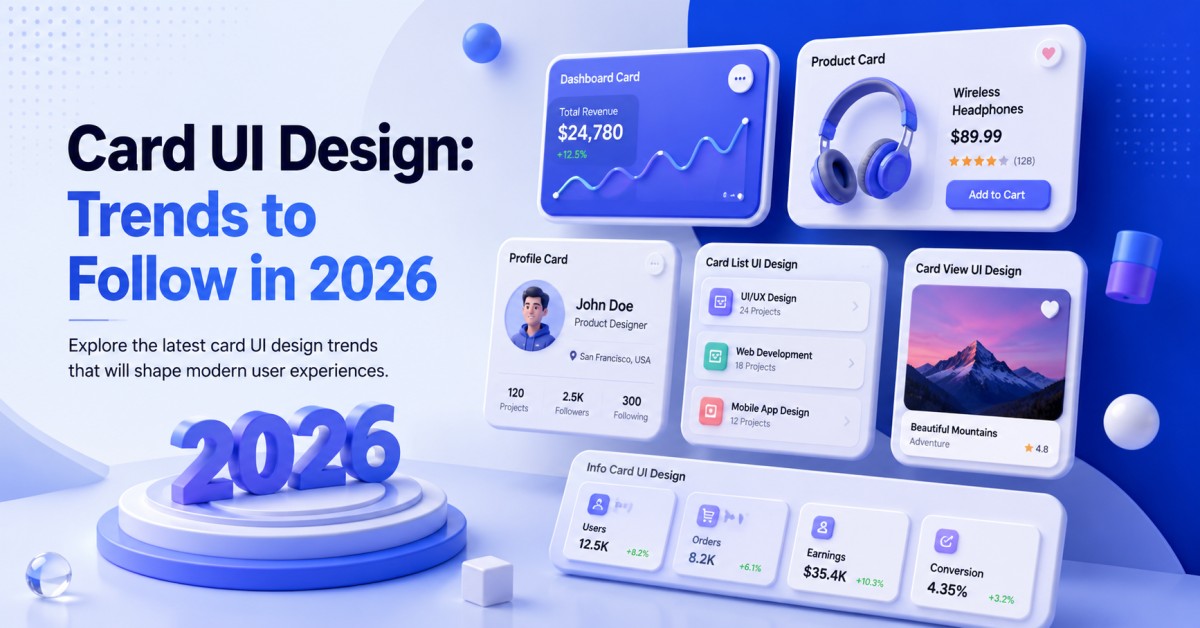
In this guide, we’ll explore the latest card UI design trends while covering popular styles such as dashboard card UI design, product card UI design, card list UI design, profile card UI design, card view UI design, and info card UI design.
What Is Card UI Design?
Card UI design is a design pattern where information is displayed inside rectangular or rounded containers called cards. Each card represents a single piece of content or action.
Cards commonly include:
- Images
- Titles
- Descriptions
- Icons
- Buttons
- Statistics
- User information
- Product details
Cards help users quickly understand information without overwhelming them.
Why Card UI Design Is Popular in 2026
Modern applications display more information than ever before. Card layouts make interfaces cleaner and more organized.
Benefits include:
- Better readability
- Easy content organization
- Mobile-friendly layouts
- Faster user interaction
- Improved visual hierarchy
- Flexible responsive design
- Better accessibility
Whether you’re building a business website, SaaS dashboard, online store, or social platform, cards provide a consistent experience across devices.
Read also: 7 Essential Design Principles Every UX Designer Should Know
Top Card UI Design Trends in 2026
1. Minimalist Card UI Design
Minimalism continues to dominate UI design. Modern cards feature:
- More white space
- Soft shadows
- Rounded corners
- Simple typography
- Limited color palettes
Removing unnecessary elements helps users focus on important information.
2. Dashboard Card UI Design Is Becoming Smarter
One of the biggest trends is dashboard card UI design. Businesses rely on dashboards to display analytics, financial reports, sales, customer activity, and project progress.
Popular dashboard cards include:
- Revenue overview
- Active users
- Sales reports
- Performance charts
- Notifications
- Tasks
- KPIs
- Progress indicators
Modern dashboards allow users to customize cards based on their preferences.
Dashboard Design Tips
- Use consistent spacing
- Group related metrics
- Highlight important KPIs
- Add quick action buttons
- Keep charts readable
Product Card UI Design for Better Conversions
Online shopping continues to grow, making product card UI design more important than ever. A well-designed product card should instantly communicate value.
Important elements include:
- Product image
- Product name
- Price
- Ratings
- Discount badge
- Availability
- Add to Cart button
- Wishlist option
2026 Product Card Trends
- Interactive hover effects
- Multiple product images
- AI-generated recommendations
- Personalized pricing
- Video previews
- Quick purchase buttons
Card List UI Design for Large Content Collections
Many applications display dozens or even hundreds of items. That’s where card list UI design becomes useful.
Examples include:
- Blog posts
- News articles
- Job listings
- Courses
- Projects
- Products
Card lists help users compare multiple items quickly.
Best Practices
- Consistent spacing
- Clear typography
- Category labels
- Filters
- Sorting options
- Pagination or infinite scrolling
Profile Card UI Design Is More Interactive
Modern applications use profile card UI design to introduce users, employees, customers, and creators. Profile cards usually contain:
- Profile picture
- Name
- Position
- Skills
- Bio
- Contact information
- Social links
- Action buttons
New Trends
- Animated avatars
- AI-generated summaries
- Verification badges
- Skill indicators
- Availability status
- Portfolio previews
Interactive profile cards improve networking and engagement.
Read also: Top Digital Transformation Companies in India (2026 Guide)
Card View UI Design for Better Browsing
Many applications now offer card view UI design instead of traditional lists. Users prefer card views because they display more visual information. Popular examples include:
- Photo galleries
- Real estate websites
- Streaming platforms
- Shopping apps
- Learning platforms
Card views work especially well on tablets and desktop devices.
Info Card UI Design for Quick Information
Businesses use info card UI design to present important details without overwhelming users. Common examples include:
- Statistics
- Weather updates
- Company information
- Financial reports
- Health metrics
- Event schedules
Good info cards emphasize clarity over decoration.
Design Tips
- Keep text concise
- Use meaningful icons
- Highlight key numbers
- Maintain visual consistency
- Avoid clutter
AI Is Influencing Card UI Design
Artificial Intelligence is changing user interface design.
AI-powered cards can now:
- Personalize recommendations
- Rearrange content automatically
- Display relevant notifications
- Predict user behavior
- Recommend products
- Customize dashboards
This makes applications more intelligent and user-friendly.
Accessibility Is a Priority
Modern card UI design must be accessible to everyone. Follow these guidelines:
- High color contrast
- Readable font sizes
- Keyboard navigation
- Screen reader compatibility
- Clear button labels
- Proper spacing
- Focus indicators
Accessible designs improve usability for all users.
Responsive Card UI Design
Users switch between cellphones, tablets, laptops, and desktop computers throughout the day. Responsive cards should:
- Resize automatically
- Maintain spacing
- Stack vertically on smaller screens
- Adapt image sizes
- Keep buttons easy to tap
A responsive design provides a uniform experience on all devices.
Micro-Interactions Improve Engagement
Small animations make interfaces feel more responsive. Examples include:
- Hover effects
- Smooth transitions
- Loading animations
- Button feedback
- Progress indicators
- Card expansion
- Drag-and-drop interactions
These modest interactions enhance the overall user experience without disturbing them.
Common Card UI Design Mistakes
Avoid these mistakes:
- Too much text
- Poor spacing
- Inconsistent layouts
- Low contrast
- Small clickable areas
- Too many colors
- Overuse of shadows
- Unclear hierarchy
A clean and focused design always performs better.
Best Tools for Designing Cards
Popular UI design tools include:
- Figma
- Adobe XD
- Sketch
- Framer
- Penpot
- Canva (for simple layouts)
These tools offer reusable components that speed up the design process.
Future of Card UI Design
As technology evolves, card interfaces will continue to become smarter.
Future trends may include:
- Voice-enabled interactions
- AI-generated layouts
- Adaptive interfaces
- 3D design elements
- Augmented reality previews
- Context-aware personalization
Designers who focus on usability, accessibility, and simplicity will create interfaces that remain effective for years to come.
To Submit your article click here
Conclusion
Card UI design remains one of the most versatile and effective design patterns in 2026. Whether you’re creating a dashboard card UI design, product card UI design, card list UI design, profile card UI design, card view UI design, or info card UI design, the goal is always the same: present information clearly and help users take action with minimal effort.
By embracing responsive layouts, accessibility, AI-powered personalization, and clean visual hierarchy, designers can create interfaces that are attractive, functional, and ready for the future.